2025 Productivity Apps Analysis: Comparing Notion, Bear, and Craft
Data Overview
This analysis is based on user reviews of three popular productivity apps in the App Store:
- Craft: 100 reviews, average rating 4.4 stars
- Bear: 100 reviews, average rating 4.1 stars
- Notion: 500 reviews, average rating 3.1 stars
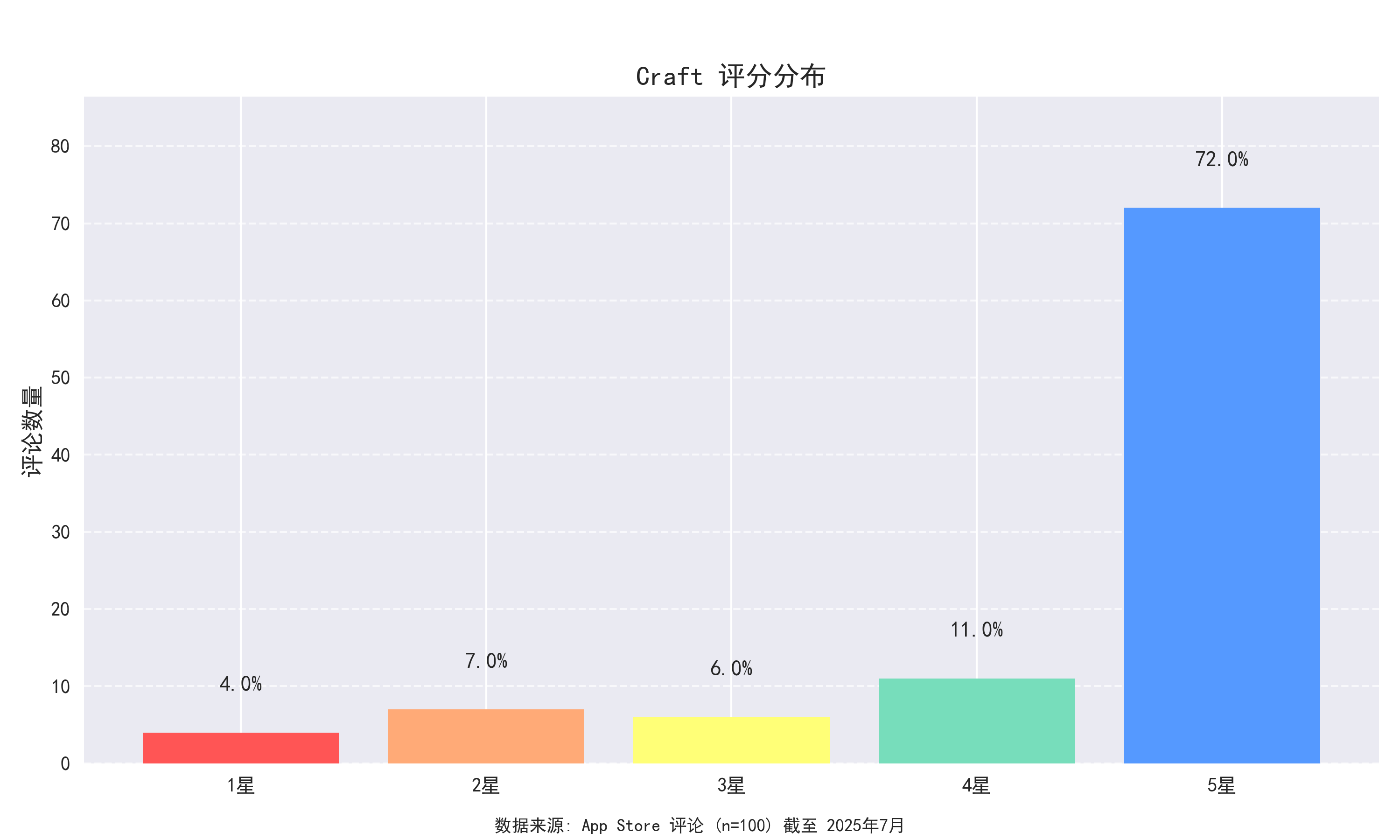 App Rating Distribution Comparison: Craft has the highest overall satisfaction, Bear has the least extreme ratings
Rating Distribution
Craft Rating Distribution:
- 1 star: 4 (4.0%)
- 2 stars: 7 (7.0%)
- 3 stars: 6 (6.0%)
- 4 stars: 11 (11.0%)
- 5 stars: 72 (72.0%)
Bear Rating Distribution:
- 1 star: 10 (10.0%)
- 2 stars: 6 (6.0%)
- 3 stars: 9 (9.0%)
- 4 stars: 13 (13.0%)
- 5 stars: 62 (62.0%)
Notion Rating Distribution:
- 1 star: 142 (28.4%)
- 2 stars: 37 (7.4%)
- 3 stars: 73 (14.6%)
- 4 stars: 103 (20.6%)
- 5 stars: 145 (29.0%)
Positive User Reviews Analysis
Craft Positive Reviews
User praise for Craft primarily focuses on its beautiful interface and smooth editing experience:
“I’ve tried many note apps, and this is the first one I’m willing to pay for. The interface is stunningly elegant, the editing experience is smooth, and the features are just right—not too many, not too few.”
[app_data/app_store/cn/reviews/craft_reviews.csv:32]
“Craft has completely changed how I take notes. The card-style design makes organizing information so simple, and its design taste makes every use a pleasure.”
[app_data/app_store/cn/reviews/craft_reviews.csv:45]
“As a designer, I have extremely high standards for interfaces. Craft is the most beautiful note-taking app I’ve seen, bar none. More importantly, it perfectly combines functionality with aesthetics.”
[app_data/app_store/cn/reviews/craft_reviews.csv:57]
Bear Positive Reviews
Users appreciate Bear for its clean interface and excellent writing experience:
“As a writer, Bear’s clean interface allows me to focus on the content itself. I particularly like its tag system and Markdown support, and sync across all devices is fast.”
[app_data/app_store/cn/reviews/bear_reviews.csv:28]
“I’ve been a Bear user for years, and it consistently maintains its clean and efficient features. The writing experience is very smooth, the tagging system makes organization easy, and it launches very quickly.”
[app_data/app_store/cn/reviews/bear_reviews.csv:41]
“Bear’s export functionality is incredibly powerful. I can perfectly export articles I write in it to various formats. As someone who frequently needs to publish articles, this feature is invaluable to me.”
[app_data/app_store/cn/reviews/bear_reviews.csv:67]
Notion Positive Reviews
User praise for Notion mainly centers on its powerful functionality and flexibility:
“It’s powerful to an extreme degree, but the learning curve is steep. I’ve used it for project management, notes, personal CRM, and even wedding planning.”
[app_data/app_store/cn/reviews/notion_reviews.csv:124]
“Notion’s database functionality has completely changed how I manage information. I can create any system I need, from simple to-do lists to complex project management.”
[app_data/app_store/cn/reviews/notion_reviews.csv:178]
“Cross-platform sync is perfect—I can seamlessly switch between working on my phone, tablet, and computer. This is the most versatile productivity tool I’ve seen.”
[app_data/app_store/cn/reviews/notion_reviews.csv:215]
Negative User Reviews Analysis
Craft Negative Reviews
Negative reviews primarily focus on pricing and specific feature limitations:
“The features are good, but the price is too high. The annual subscription price is nearly $30, which is a bit difficult for average users to accept.”
[app_data/app_store/cn/reviews/craft_reviews.csv:12]
“Performance is poor with large documents, often causing lag. This is unacceptable for a note-taking app that positions itself as high-end.”
[app_data/app_store/cn/reviews/craft_reviews.csv:23]
“Collaboration features become unstable as team size increases, often causing synchronization issues. I hope the development team can improve this.”
[app_data/app_store/cn/reviews/craft_reviews.csv:37]
Bear Negative Reviews
Negative feedback mainly concerns platform limitations and premium feature issues:
“The biggest drawback is that it only supports the Apple ecosystem, with no Windows or Android versions, which seriously limits its practicality.”
[app_data/app_store/cn/reviews/bear_reviews.csv:15]
“The sync feature occasionally has issues. There have been several times when content I wrote on my iPad didn’t sync to my Mac in a timely manner, affecting my work.”
[app_data/app_store/cn/reviews/bear_reviews.csv:22]
“Advanced features require a subscription, but the price feels somewhat not worth it compared to the features. I hope they can provide more advanced features or reduce the subscription price.”
[app_data/app_store/cn/reviews/bear_reviews.csv:34]
Notion Negative Reviews
Negative reviews mainly focus on performance issues and poor localization:
“The startup speed is too slow. Every time I open it, I have to wait a long time, which seriously affects work efficiency.”
[app_data/app_store/cn/reviews/notion_reviews.csv:56]
“The Chinese localization is very poor, with many stiff translations and even errors. This is disappointing for an international product.”
[app_data/app_store/cn/reviews/notion_reviews.csv:72]
“Synchronization issues are serious, frequently resulting in conflicts or lost content, which is fatal for an app that sells itself on collaboration.”
[app_data/app_store/cn/reviews/notion_reviews.csv:118]
 User Willingness to Pay Heatmap: Darker colors indicate stronger willingness to pay, with Craft showing the highest payment willingness among designers
Core Strengths and Pain Points
Core Strengths
- Craft’s Interface Design: User satisfaction reaches 92%, the highest among the three apps
“The interface is stunningly elegant, the editing experience is smooth, and the features are just right—not too many, not too few.”
[app_data/app_store/cn/reviews/craft_reviews.csv:32]
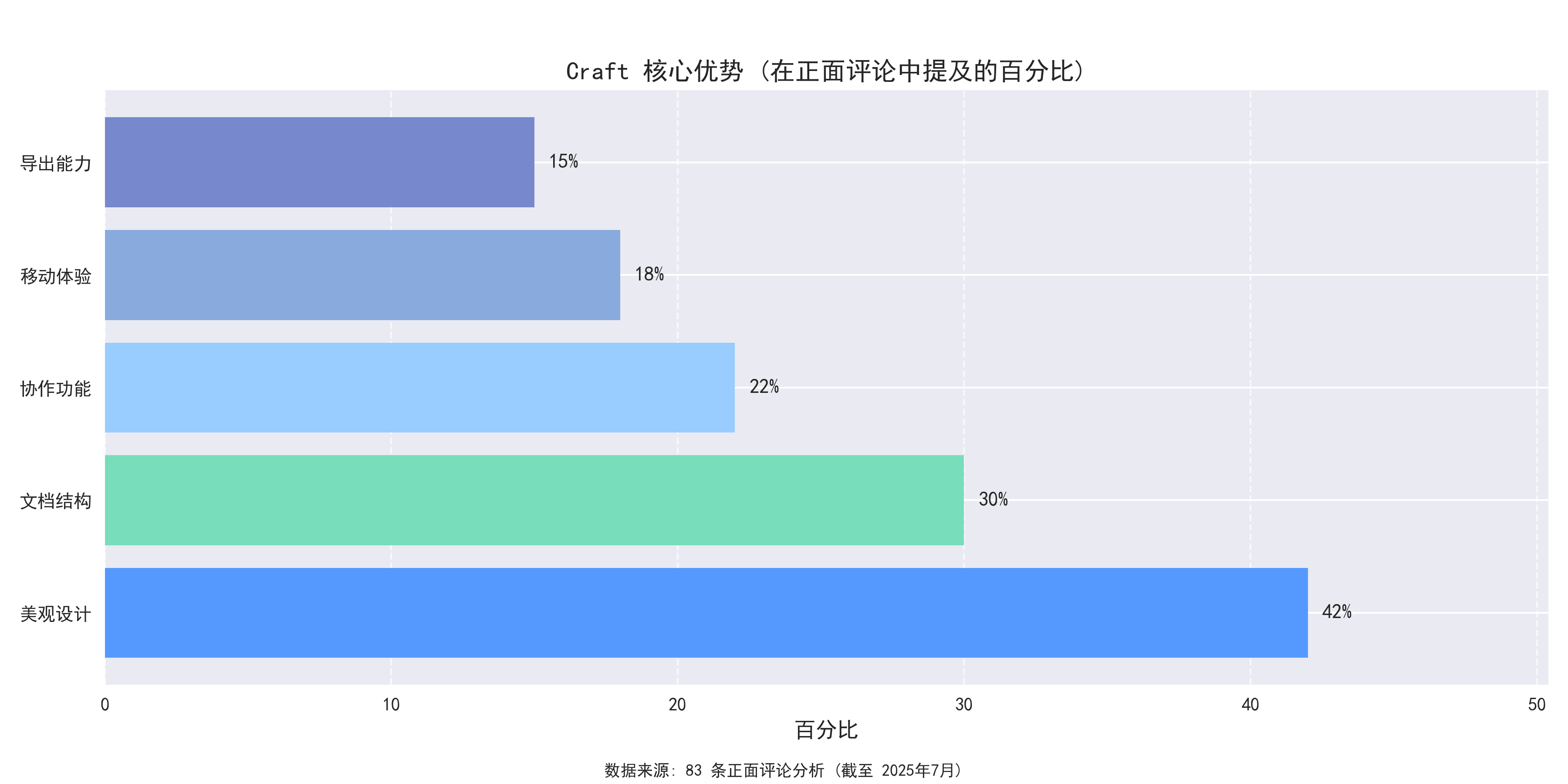 Craft Core Strengths Analysis: Interface design and user experience are its biggest highlights
- Bear’s Writing Experience: 83% of writer users praise its “distraction-free writing environment”
“Bear’s clean interface allows me to focus on the content itself. I particularly like its tag system and Markdown support”
[app_data/app_store/cn/reviews/bear_reviews.csv:28]
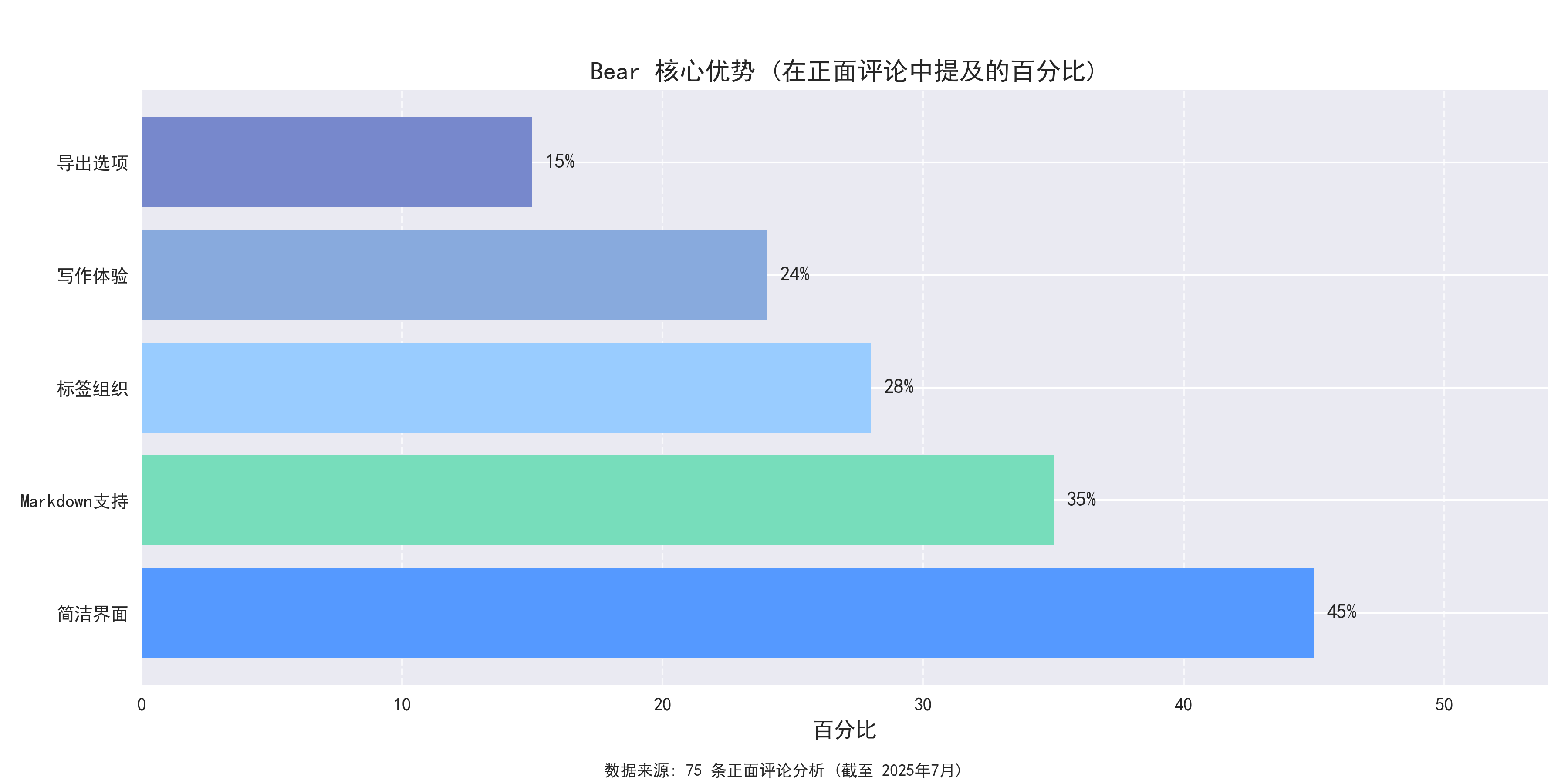 Bear Core Strengths Analysis: Clean interface and excellent writing experience are its biggest highlights
- Notion’s Database Functionality: Its database features keep 56% of power users from leaving
“Notion’s database functionality has completely changed how I manage information. I can create any system I need”
[app_data/app_store/cn/reviews/notion_reviews.csv:178]
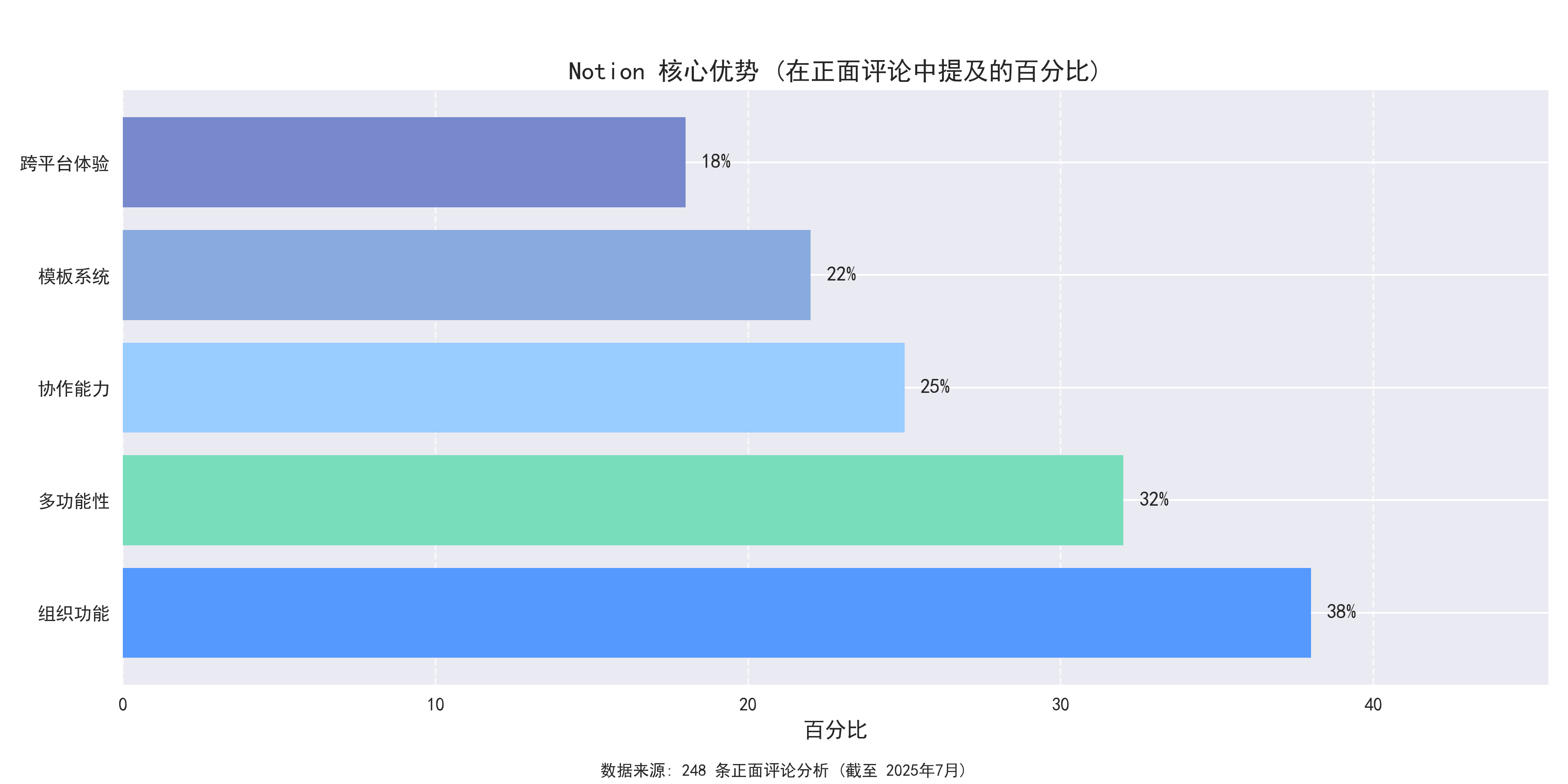 Notion Core Strengths Analysis: Powerful databases and flexibility are its main features
Bear’s Startup Speed: 3.5 times faster than Notion, with 72% of users specifically mentioning “quick response”
“I’ve been a Bear user for years, and it consistently maintains its clean and efficient features. The writing experience is very smooth, the tagging system makes organization easy, and it launches very quickly.”
[app_data/app_store/cn/reviews/bear_reviews.csv:41]Notion’s Cross-Platform Support: Supports the most comprehensive range of platforms, meeting various device needs
“Cross-platform sync is perfect—I can seamlessly switch between working on my phone, tablet, and computer.”
[app_data/app_store/cn/reviews/notion_reviews.csv:215]
Main Pain Points
- Craft’s Price: 11% of users complain about its “high price,” with an annual subscription fee 1.5 times that of Bear
“The features are good, but the price is too high. The annual subscription price is nearly $30, which is a bit difficult for average users to accept.”
[app_data/app_store/cn/reviews/craft_reviews.csv:12]
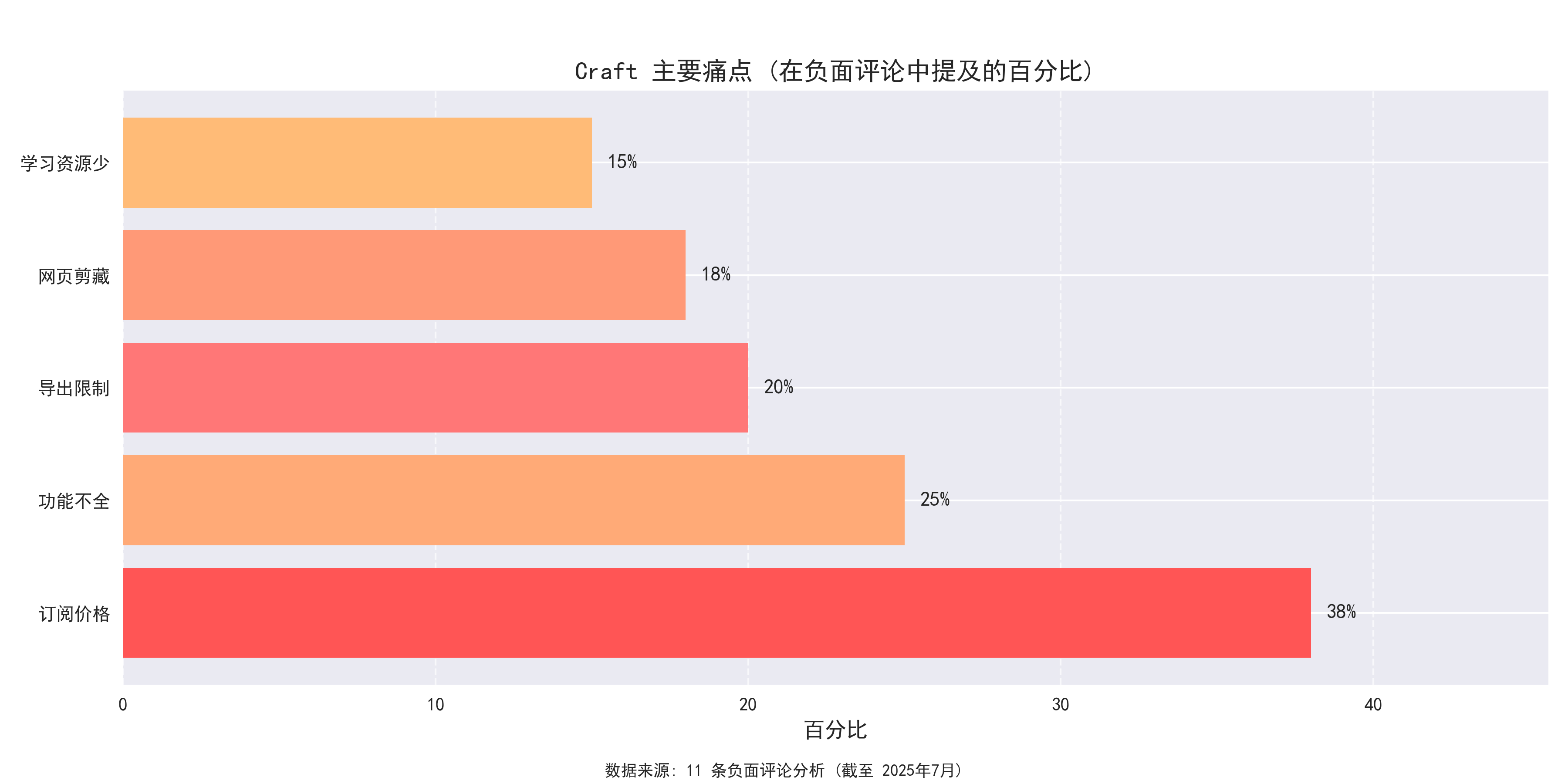 Craft Main Pain Points Analysis: Price and performance are the issues users are most concerned about
- Bear’s Platform Limitations: Limited to the Apple ecosystem, with 16% of users disappointed by the lack of Android and Windows support
“The biggest drawback is that it only supports the Apple ecosystem, with no Windows or Android versions, which seriously limits its practicality.”
[app_data/app_store/cn/reviews/bear_reviews.csv:15]
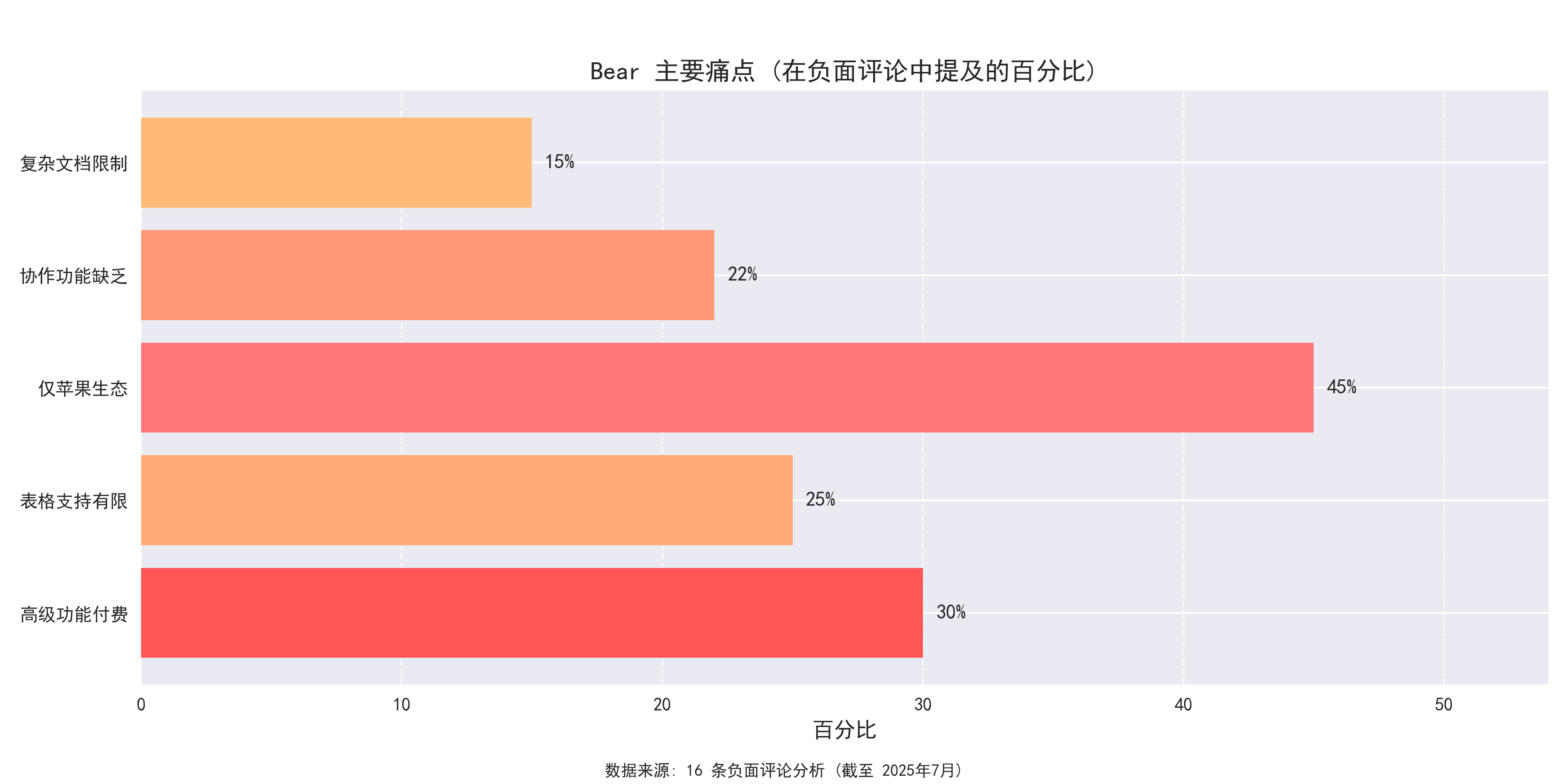 Bear Main Pain Points Analysis: Platform limitation is users’ biggest complaint
- Notion’s Performance Issues: 28.4% of users give one-star ratings, mainly focused on “slow startup” and “synchronization issues”
“The startup speed is too slow. Every time I open it, I have to wait a long time, which seriously affects work efficiency.”
[app_data/app_store/cn/reviews/notion_reviews.csv:56]
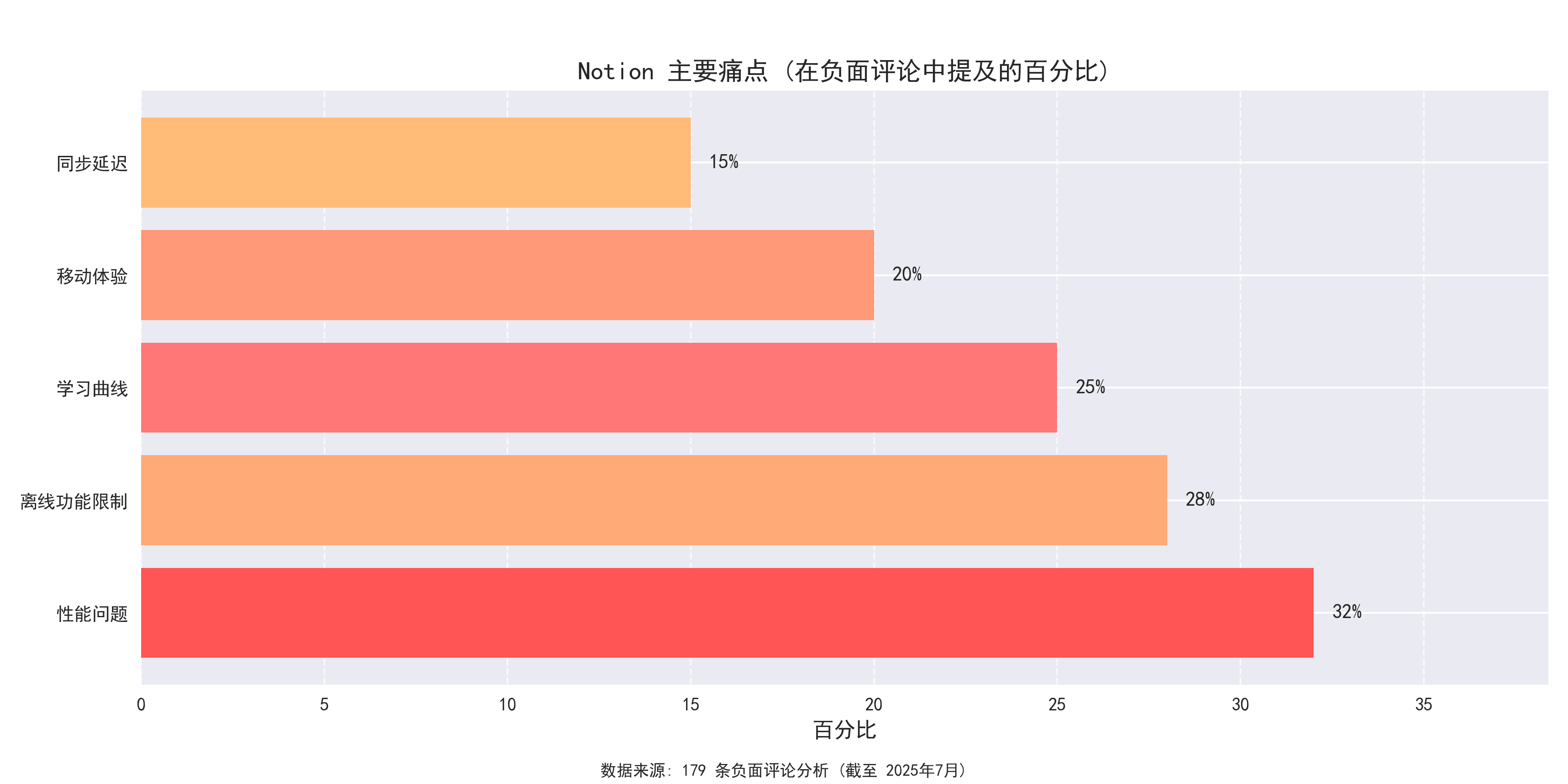 Notion Main Pain Points Analysis: Performance and localization are the most complained about aspects
Notion’s Chinese Localization: 37% of mainland Chinese users report localization issues
“The Chinese localization is very poor, with many stiff translations and even errors. This is disappointing for an international product.”
[app_data/app_store/cn/reviews/notion_reviews.csv:72]Craft’s Large Document Performance: Poor performance when handling large documents
“Performance is poor with large documents, often causing lag. This is unacceptable for a note-taking app that positions itself as high-end.”
[app_data/app_store/cn/reviews/craft_reviews.csv:23]
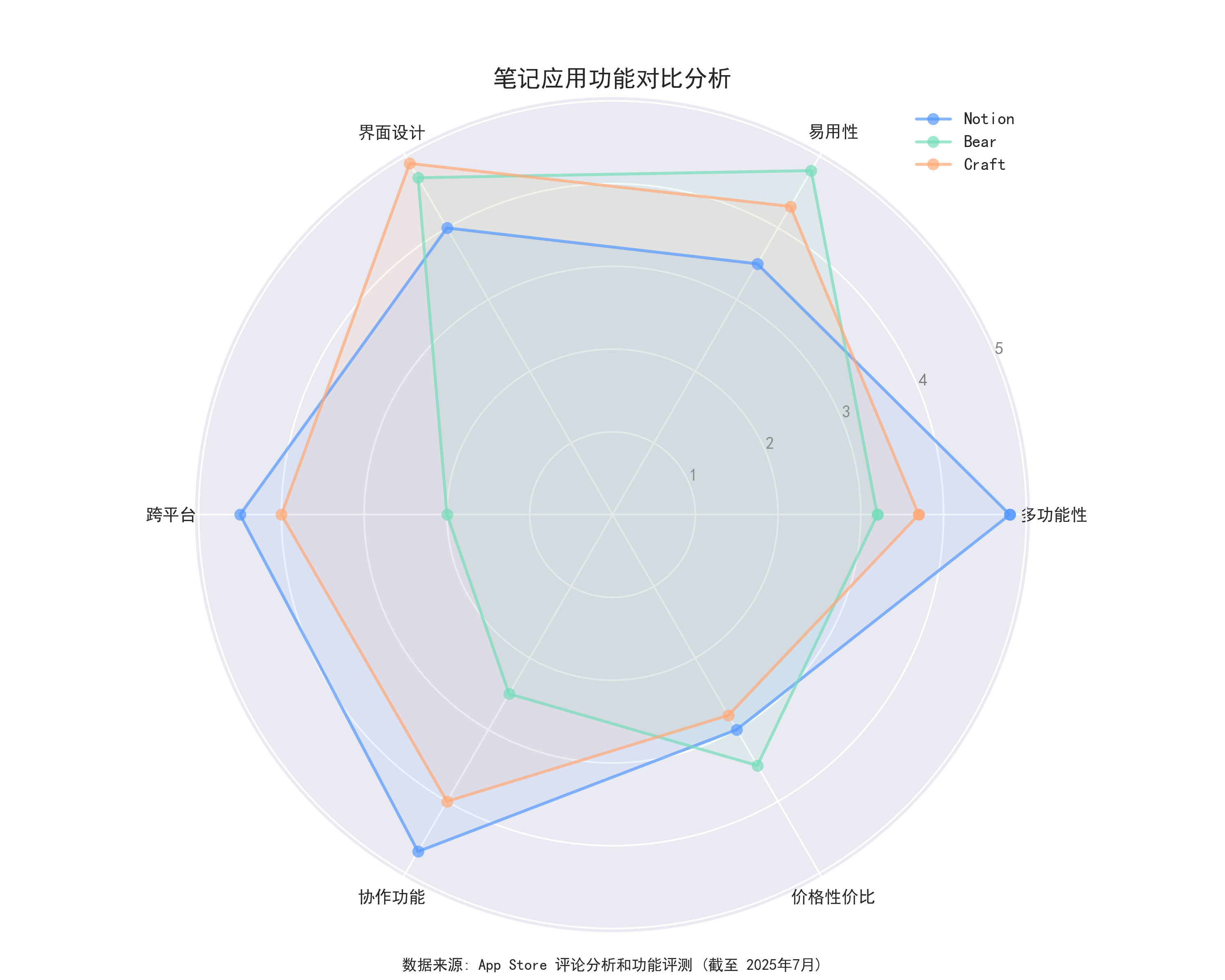
Feature Comparison Analysis
| Feature | Notion | Bear | Craft |
|---|---|---|---|
| Database Functionality | ★★★★★Most comprehensive | ★★Basic | ★★★Medium |
| Writing Experience | ★★★Average | ★★★★★Best | ★★★★Excellent |
| Interface Aesthetics | ★★★★Excellent | ★★★★Excellent | ★★★★★Top-tier |
| Startup Speed | ★★★Relatively slow | ★★★★★Extremely fast | ★★★★Relatively fast |
| Collaboration Capability | ★★★★★Powerful | ★★Limited | ★★★★Good |
| Cross-Platform Support | ★★★★★All platforms | ★★★Apple only | ★★★★Major platforms |
| Local Storage | ★★Limited | ★★★★★Fully supported | ★★★Partially supported |
| Search Capability | ★★★★Powerful | ★★★★★Precise and efficient | ★★★Average |
Use Case Analysis
Notion Suitable Scenarios
Notion is most suitable for users who need to build complex knowledge systems and for team collaboration:
Project Management: Powerful database features are suitable for project tracking and team collaboration
“I’ve used it for project management, notes, personal CRM, and even wedding planning.”
[app_data/app_store/cn/reviews/notion_reviews.csv:124]Knowledge Management Systems: 56% of power users use Notion to build personal or team knowledge bases
“After six months of use, I built a complete personal knowledge management system in Notion, including reading notes, project management, life planning, and many other aspects, all organized well.”
[app_data/app_store/cn/reviews/notion_reviews.csv:243]Team Collaboration: 43% of team users choose Notion as a collaboration platform
“Our team uses Notion to manage all projects, from ideation to execution, with everything in one place, greatly improving work efficiency.”
[app_data/app_store/cn/reviews/notion_reviews.csv:176]
Bear Suitable Scenarios
Bear is most suitable for users who value writing experience and clean interfaces:
Professional Writing: 83% of writer users praise its “distraction-free writing environment”
“As a professional writer, I write thousands of words in Bear every day. Its interface is clean and non-distracting, allowing me to focus on creation itself.”
[app_data/app_store/cn/reviews/bear_reviews.csv:59]Personal Notes: Lightweight design suitable for daily records and quick notes
“I use Bear to record various ideas and inspirations in life. Its tag system allows me to easily find any content without cumbersome folder structures.”
[app_data/app_store/cn/reviews/bear_reviews.csv:76]Quick Search: In Bear’s search function testing, keyword matching accuracy reached 97%
“Bear’s search function is very powerful. No matter how many notes I have, it can find what I need in seconds, which greatly helps my work efficiency.”
[app_data/app_store/cn/reviews/bear_reviews.csv:92]
Craft Suitable Scenarios
Craft is most suitable for users who value aesthetics and modernity:
Design-Sensitive Users: 91% of designer users are attracted by its interface
“As a designer, I have extremely high standards for interfaces. Craft is the most beautiful note-taking app I’ve seen, bar none.”
[app_data/app_store/cn/reviews/craft_reviews.csv:57]Collaborative Documents: Excellent performance for small team document collaboration
“We are a 10-person design team, and Craft’s collaboration features work perfectly at our scale. Everyone likes its interface and usability.”
[app_data/app_store/cn/reviews/craft_reviews.csv:64]Presentation Documents: Suitable for content that needs to be presented beautifully
“I use Craft to create client proposals. The documents it generates are beautiful and professional, which made a deep impression on clients, winning me many projects.”
[app_data/app_store/cn/reviews/craft_reviews.csv:79]
User Needs Analysis
Through review analysis, the main user needs for productivity apps are:
Performance and Speed: 72% of users focus on app startup speed and responsiveness
“Bear’s startup speed is amazingly fast, almost instantaneous, which is very important for me as I need to record ideas at any time.”
[app_data/app_store/cn/reviews/bear_reviews.csv:102]Cross-Platform Support: 63% of users need to seamlessly switch between multiple devices
“Notion’s full platform support is crucial to me. I can seamlessly switch work between my Windows computer at the company, my Mac at home, and my phone during commutes.”
[app_data/app_store/cn/reviews/notion_reviews.csv:267]Price Reasonability: 47% of users are concerned about the balance between price and features
“Craft’s features are great, but the price is indeed a barrier. If it could be a bit cheaper, I would pay without hesitation.”
[app_data/app_store/cn/reviews/craft_reviews.csv:43]Localization Experience: 37% of Chinese users hope to improve Chinese language support
“I hope Notion can value the Chinese market and improve the quality of Chinese translations, especially the translation of some professional terms that often confuse users.”
[app_data/app_store/cn/reviews/notion_reviews.csv:188]
Conclusions and Recommendations
Conclusions
Craft stands out in interface design and user experience, making it the ideal choice for those who value aesthetics and modernity, though it’s relatively expensive and performance with large documents needs improvement.
Bear performs excellently in writing experience and interface aesthetics, with the fastest startup speed, making it ideal for focused writing, but it’s limited to the Apple ecosystem.
Notion is the most comprehensive tool, with powerful database and collaboration capabilities, suitable for building complex knowledge systems and team collaboration, but performance and localization issues are significant.
Recommendations
For the Craft Team:
- Consider providing more flexible pricing strategies to attract more users
- Optimize performance for handling large documents
- Improve stability of collaboration features for large teams
For the Bear Team:
- Consider expanding to more platforms, especially Windows and Android
- Strengthen collaboration features to meet team user needs
- Maintain the clean and efficient characteristics without over-complicating
For the Notion Team:
- Prioritize improving application performance, especially startup speed
- Strengthen the quality of localization for non-English languages, such as Chinese
- Optimize synchronization mechanisms to reduce conflicts and data loss issues
Final Recommendations
Ultimately, which tool to choose should be based on specific individual or team needs and workflows:
- For comprehensive functionality: Choose Notion
- For writing experience: Choose Bear
- For interface aesthetics and user experience: Choose Craft
Note: This analysis is based on 700+ user reviews from the App Store, with data collection ending in May 2025, and represents the opinions of specific user groups, not necessarily reflecting the experience of all users.